Welcome to Monk
Last updated: January 24, 2026
Overview
Monk is a contract-to-cash automation platform that streamlines revenue operations from contract processing to payment collection. Whether you're managing invoices, tracking accounts receivable, or forecasting revenue, Monk brings all your financial operations into one intelligent system.
What Monk Does
Contract Processing
Upload contracts and let AI extract billing details automatically. Monk reads your contracts, identifies key terms like pricing, payment schedules, and renewal dates, then creates the corresponding customer records and invoices.
Revenue Management
Track customers, invoices, and product plans in one place. This gives you full visibility into your customer base, outstanding invoices, and revenue streams.
Intelligent Collections
AI agents automate accounts receivable follow-ups and communications. Monk drafts personalized collection messages, sends them on your behalf, and surfaces conversations that need human attention.
Integrations
Connect to your existing tools to create a seamless workflow:
Integration | What It Does |
QuickBooks | Sync invoices and financial data |
NetSuite | Connect your ERP data |
Stripe | Import payment data and revenue |
Gmail | Send collection messages from your email |
Slack | Receive notifications and alerts |
HubSpot | Sync contracts, contacts, and invoices |
Salesforce | Connect your CRM data |
Anrok | Automated tax compliance |
The Monk Dashboard
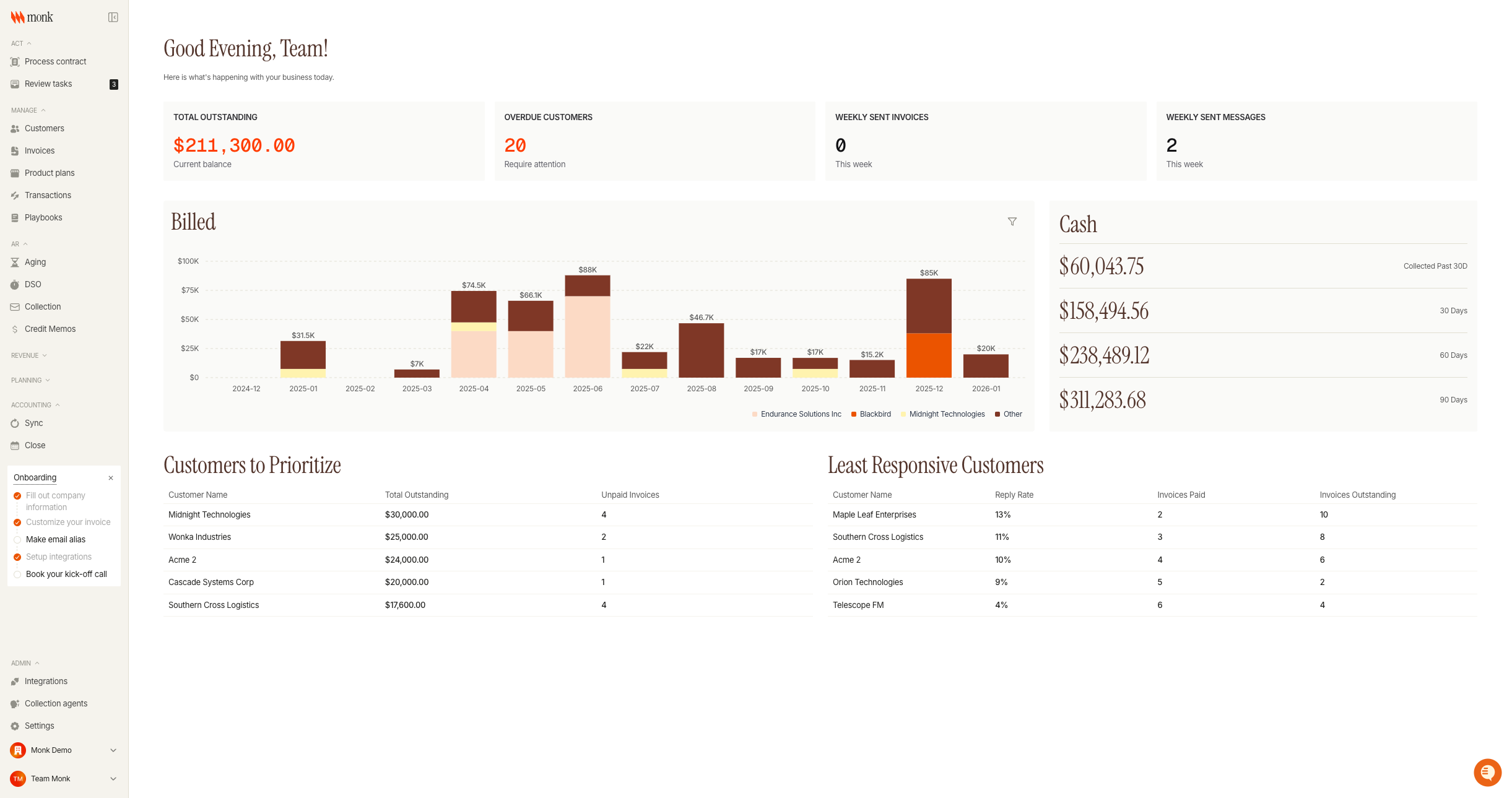
Metric | What It Shows |
Total Outstanding | Current balance owed by all customers |
Overdue Customers | Number of customers requiring attention |
Weekly Sent Invoices | Invoices created this week |
Weekly Sent Messages | Collection messages sent this week |
Platform Navigation
Monk organizes features into sections accessible from the sidebar:
Act
Take action on incoming work:
Process contract - Upload and process new contracts
Review tasks - Handle pending items requiring attention
Manage
Core data management:
Customers - View and manage customer records
Invoices - Track all invoices and payment status
Product plans - Define your pricing and billing structures
Transactions - Record and view all financial transactions
Playbooks - Create automated workflows with conditional logic
AR (Accounts Receivable)
Track what you're owed:
Aging - View receivables by aging bucket (current, 30, 60, 90, 120+ days)
DSO - Monitor Days Sales Outstanding metrics
Collection - Manage collection conversations and follow-ups
Credit Memos - Track credits and adjustments
Revenue
Understand your revenue:
Billed vs. collected - Compare what you've invoiced to what you've received
Recurring - Track subscription and recurring revenue
Revenue recognition - Manage revenue recognition schedules
Deferred roll-forward - Track deferred revenue changes
Planning
Plan for the future:
Contract renewals - Track upcoming renewals and expirations
Forecasting - Project future revenue and collections
Accounting
Keep your books in sync:
Sync - View integration sync status and history
Close - Month-end close management
Getting Started
1. Set up your organization
Navigate to Settings to configure your company details, branding, and team members.
2. Connect integrations
Go to Integrations to connect your accounting system (QuickBooks, NetSuite), payment processor (Stripe), and communication tools (Gmail, Slack).
3. Upload your first contract
Click Process contract in the sidebar to upload a contract. Monk will extract the billing details and create the corresponding customer and invoice records.
4. Configure your collection agent
Visit Collection agents to customize how Monk handles follow-ups:
Set your follow-up timing and cadence
Customize your agent's identity and signature
Define escalation rules for when to involve a human
5. Create playbooks
Build automated workflows in Playbooks to handle recurring scenarios like payment reminders, renewal notifications, or escalation procedures.
Key Concepts
Contract-to-Cash Flow
The complete journey from signed contract to collected payment:
Contract upload - Upload or receive a new contract
AI extraction - Monk reads and extracts billing terms
Record creation - Customer and invoice records are created
Invoice delivery - Send invoices via email or integration
Collection - Automated follow-ups until payment
Reconciliation - Match payments to invoices
Playbooks
Automated workflows that execute based on conditions. Use playbooks to:
Send payment reminders at specific intervals
Escalate overdue invoices to team members
Trigger actions when customers respond
Apply different strategies for different customer segments
Collection Agents
AI-powered assistants that handle routine collection tasks:
Draft and send follow-up messages
Respond to common customer questions
Escalate complex issues to your team
Track conversation history and context